
GyanBatua AI Review: Features, Pricing, and Honest Verdict
Overview: An honest overview of GyanBatua AI — the JD-based resume optimizer and interview prep platform. What it does, what it costs, where it fits, and what it doesn't do.

Introduction
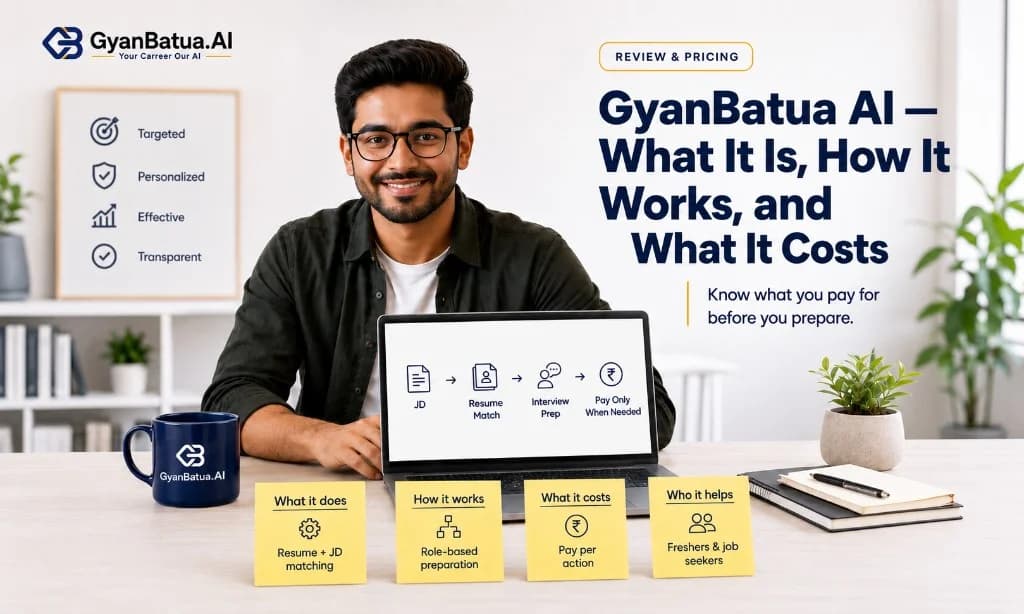
GyanBatua AI is a career preparation platform built for Indian job seekers. It does two things: optimises your resume against a specific job description, and prepares you for the interview that follows — using the same JD as context.
This page explains how it works, what it costs, and where it fits relative to other tools.
What GyanBatua actually does
Resume Optimizer
You upload your resume and paste a job description. GyanBatua analyses the match: keyword coverage, gap analysis, section-by-section alignment, and rewrite suggestions. The output is specific to that one JD — not a generic score.
The core concept is the JD-tuned resume: instead of writing one resume and sending it everywhere, you tune each resume to the role you're actually applying to. GyanBatua automates the analysis and suggestion step so you're not doing it manually for every application.
AI Interview Prep
After tuning your resume, you can practice for the interview. GyanBatua's AI tutor asks questions shaped by the same JD — so the interview practice matches the role you're preparing for, not a generic question bank.
Two modes: text-based practice (structured Q&A with written feedback) and voice mock (spoken practice with delivery feedback on pacing, clarity, filler words, and structure).
Pricing — pay-per-action, no subscription
- Resume Build — ₹11: Create or refresh a clean, ATS-friendly resume
- JD Match — ₹11: Match score + keyword gaps + rewrite suggestions vs. one JD
- AI Tutor — Text — ₹21: text practice session, role-specific questions
- AI Tutor — Voice — ₹51: 30-minute voice mock with delivery feedback
All prices include GST. No subscription. You pay when you're applying, not when you're not.
For a fresher running five targeted applications, the total spend is ₹105–₹500 depending on how many features you use per role. Compare that to ₹1,200–₹3,000/month for Resume Worded or Jobscan subscriptions.
What makes it different from other tools
- JD-specific flow: Most resume tools score your resume generically. GyanBatua scores it against a specific job description. Most interview prep tools use a generic question bank. GyanBatua builds questions from the same JD.
- India-first: Built for the ATS systems Indian companies use (iCIMS at TCS, InfyTQ at Infosys, standard parsers at Wipro, Accenture, Deloitte). Vocabulary, formatting expectations, and pricing are designed for the Indian job market.
- Micro-payments: No monthly commitment. No bundle you didn't ask for. Pay for what you use, per application.
- Honest representation: GyanBatua's stated principle is better positioning, never fabrication. The tool helps you present real experience more effectively — it doesn't invent titles, skills, or achievements you don't have.
What it doesn't do
GyanBatua is not a job board. It doesn't find or list jobs — you bring the JD from wherever you found the role (Naukri, LinkedIn, company career page).
It doesn't write your resume from scratch using AI-generated content. The resume build gives you structure; the JD Match tunes your existing content. You provide the substance.
It doesn't guarantee placement. No tool can. It improves your resume's match rate and your interview readiness — the outcomes depend on your actual skills, preparation, and the competitive field.
Who it's built for
Students and freshers in placement season. Active job seekers applying to multiple roles. Working professionals switching roles or companies. Anyone who wants to stop sending the same resume to every JD and start targeting.
Try it
The fastest way to evaluate GyanBatua is to run one JD Match: paste a job description you're actually applying to, upload your resume, and see the match score and gaps. ₹11. Takes two minutes.
Related reading on GyanBatua
Also useful in the Resume cluster:
Is your resume good enough?
Drop your resume here or . PDF & DOCX only. Max 5MB file size.
Resume guides
Related Resume Guides
About the Author
Talent Acquisition Manager at Mobiloitte
Talent Acquisition Manager at Mobiloitte, crafting beautiful recruitment workflows and sourcing technical talent.
Pricing
Choose your plan and get started faster
Compare features, pricing, and usage clearly, then pick the plan that fits your goal.
Next step
Check your resume against a real job description
See JD match, keyword visibility, and skill gaps before you apply.
Related reading
13Recent articles
6