AI Resume Builder in India: How to Choose and Use AI for Your Resume
Overview: Learn how to choose an AI resume builder in India, build an ATS-friendly resume, tailor it to a job description, and use AI responsibly without inventing experience.

Quick Answer
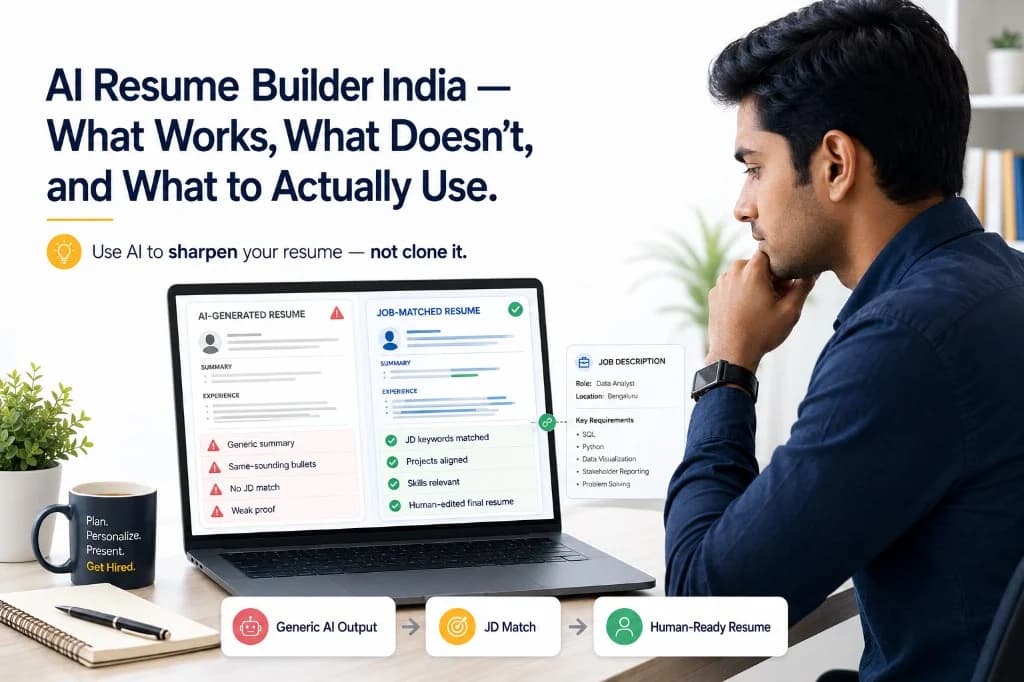
An AI resume builder is software that uses artificial intelligence to help job seekers structure sections, draft professional summaries, refine bullet point phrasing, and format an ATS-readable document. When provided with target job description details, advanced builders can also suggest role-specific keyword alignment.
However, AI assistance is never a substitute for candidate truthfulness. An AI tool can polish your phrasing and organize your layout, but you must provide and verify every fact, degree, project contribution, and metric. If you need to evaluate an existing resume against a specific role before applying, compare your resume to the job description to identify genuine gaps rather than generating generic filler text.
What Should a Good AI Resume Builder Actually Do?
Modern online resume builder platforms and AI resume maker tools have evolved beyond static templates. A capable AI resume builder should support the candidate across every phase of drafting and formatting while preserving complete user control. Look for tools that combine intelligent drafting with clean document architecture.
Core capabilities that define a high-quality ATS resume builder and resume maker include:
- Structured resume creation: Assembles standard resume sections—contact information, professional summary, work experience, education, academic projects, and technical skills—in a clean, logical hierarchy.
- Editable content control: Allows complete editing of every generated sentence, bullet point, and heading so you maintain total ownership over your document.
- ATS-readable layout generation: Generates single-column, parser-friendly designs that render standard system fonts and parse cleanly without complex multi-column tables or text boxes.
- Summary and bullet phrasing assistance: Translates raw accomplishments into concise, action-driven bullet points using strong verbs without exaggerating responsibilities.
- Job description alignment: Identifies key skills and domain terminology from the target JD so you can highlight your real, matching background.
- Fact verification safeguards: Prompts you to confirm technical details and outcomes rather than hallucinating fake metrics, certifications, or tools.
- Clean standard export: Exports clean PDF and DOCX documents with selectable text that open correctly across all operating systems and employer screening portals.
AI Resume Builder vs Resume Checker vs Resume Optimizer
Job seekers often use terms like resume maker, AI CV builder, resume optimizer, and ATS resume checker interchangeably. In practice, these tools serve distinct functions in your application workflow:
- AI Resume Builder (ai resume maker): Designed for document creation. It guides you through entering your credentials, structures your sections, drafts initial text, and exports a formatted resume.
- ATS Resume Checker (ats resume checker with job description): Designed for document evaluation. It audits an existing resume for formatting errors, section parsing clarity, and alignment against a specific job description.
- Resume Optimizer (resume optimizer / ai resume editor): Designed for document refinement. It polishes phrasing, removes wordiness, strengthens action verbs, and optimizes keyword representation on an existing draft.
- Job Description Matcher (resume job description match): Evaluates the semantic overlap between your verified skills and a specific role, highlighting missing requirements you might have omitted.
For a dedicated comparison of when to build a new document versus when to audit an existing one, explore our guide on ATS checker vs resume builder.
How to Use an AI Resume Builder Well
To get high-value output from an AI resume editor without producing generic, template-sounding copy, follow a disciplined 5-step workflow:
- Start with your verified factual background: Gather your real project details, degrees, coursework, tools, and work history before opening any tool. AI needs accurate input to generate useful suggestions.
- Choose your target role family: Select the specific domain (e.g., frontend engineering, data analytics, business development) so the tool uses appropriate industry terminology.
- Generate and organize standard sections: Build the document structure step by step, using AI to draft initial section outlines and format contact details, education, experience, and skills.
- Review and edit every AI-generated sentence: Read every bullet aloud. Remove generic buzzwords, replace vague claims with exact project contributions, and ensure you can defend every point in an interview.
- Tailor the final draft against the target job description: Perform disciplined resume tailoring by aligning your genuine skills with the vocabulary used in the employer's posting before finalizing your file.
When using AI resume writing tools, remember that recruiters evaluate clarity and substance. A concise resume grounded in real work will always outperform an over-embellished AI draft.
Building an ATS-Friendly Resume with AI
An ATS friendly resume builder must prioritize parsing reliability over decorative visual flair. Applicant tracking systems used by employers in India and globally parse resumes to extract structured candidate profiles for hiring managers.
Essential formatting principles to create ATS friendly resume layouts:
- Standard section headings: Use universal titles such as 'Work Experience', 'Education', 'Projects', 'Skills', and 'Summary' so automated parsers categorize your data correctly.
- Clean single-column flow: A single-column vertical layout ensures consistent parsing order across all recruitment software, avoiding text scrambling that can occur with complex sidebars or multi-column grids.
- Selectable text: Always export a text-layer PDF or DOCX. Never submit flattened images, scanned documents, or graphics-heavy portfolio exports that parsers cannot read.
- Standard system typography: Choose clean fonts like Inter, Calibri, Arial, or Helvetica with consistent sizing (10–12pt body text, 14–16pt headings).
- Consistent date formats: Maintain a uniform date structure (e.g., 'May 2024 – Present' or '06/2023 – 05/2024') across your education and work experience.
- No embedded tables or text boxes: Keep contact information and key qualifications in the main body flow rather than inside headers, footers, or floating text frames.
A clean, readable structure reduces unnecessary parsing ambiguity. However, no layout or tool can guarantee an interview shortlist—employer hiring systems differ, and human recruiters make the final evaluation based on actual qualifications.
Using AI with a Job Description
A generic AI resume builder works purely from the candidate's prompt or form inputs. In contrast, an AI resume builder based on job description capabilities compares candidate details directly with the target role's requirements.
How a JD-aware workflow assists your application:
- Identifies core technical requirements: Highlights the specific programming languages, frameworks, methodologies, or certifications mentioned in the job description.
- Prioritizes your genuine matching experience: Surfaces projects, coursework, or responsibilities from your background that directly demonstrate the required competencies.
- Aligns industry terminology: Rephrases genuine accomplishments using the employer's phrasing (e.g., changing 'customer support' to 'client issue resolution' if that is what the JD requests).
- Highlights missing qualifications honestly: Shows you where your profile has gaps so you can prepare honest explanations or address them in your cover letter.
Critical boundary: AI must never fill skill gaps by inventing technologies or tools you have not used. If a role requires a framework you do not know, do not add it to your resume. For a full methodology on analyzing JDs, read our guide on how to tailor your resume to a job description.
What AI Should — and Should Not — Write
AI is a powerful assistant for phrasing, grammar, and structure, but relying on unverified generative output creates serious risks during technical interviews. Use this clear GOOD / REVIEW / NEVER framework:
- GOOD USES: Improving sentence flow, eliminating grammatical errors, converting passive sentences into active voice, drafting summary openers, and organizing bullet structures.
- REVIEW CAREFULLY: Tool proficiency levels, descriptions of collaborative team projects, role scopes, and contextual impact estimates.
- NEVER ACCEPT IF INVENTED: Employers you did not work for, job titles you did not hold, dates of employment, degrees or certifications you did not earn, unverified programming languages, fabricated percentage metrics, or claimed leadership of projects built by others.
When using a resume bullet generator, always supply the raw facts and use the AI output strictly as an editorial draft.
Illustrative before-and-after bullet transformation:
Weak (Raw input): Worked on a web application project with a team. Improved (Illustrative AI refinement): Developed reusable React components for a [project name], integrated REST APIs for [feature], and resolved UI state bugs using [tool]. Note: This example is illustrative. Replace placeholders with facts you can defend in technical interviews.
AI Resume Builders for Freshers vs Professionals
Different career stages require different resume strategies. An Indian resume builder should adapt its structural recommendations depending on whether you are entering the job market or expanding an established career:
- Resume builder for freshers and college students: Emphasizes academic degrees, coursework, major projects, internships, hackathons, and technical skills. AI helps structure a concise 1-page document and draft a clear opening summary. For complete layout advice, see our fresher resume format guide and fresher resume summary examples.
- Working professionals and career switchers: Focuses on chronological career progression, measurable business impact, leadership responsibilities, and role-specific achievements. AI helps condense multi-year work histories, remove outdated legacy bullets, and tailor senior terminology to executive job descriptions.
How to Choose the Best AI Resume Builder for You
Searches for the best AI resume builder often return lists of tools making exaggerated claims about automated job offers or secret recruiter algorithms. In reality, there is no single universal tool for every applicant. The right platform depends on your specific workflow, whether you need creation, ATS audit, or JD tailoring.
Use this 9-point evaluation checklist when choosing an AI resume builder:
- Full editorial control: The tool must allow you to edit, rephrase, and delete every single AI-generated sentence.
- ATS-readable formatting: Exports clean single-column PDF and DOCX files with selectable text and standard headings.
- Job description context: Offers features to analyze the target JD and compare your genuine qualifications against role requirements.
- Ethical AI safeguards: Prompts you to verify facts rather than hallucinating fake metrics or credentials.
- Flexible, clean templates: Provides professional, distraction-free templates without restrictive multi-column designs or decorative graphics.
- Transparent pricing: Clearly states costs upfront—whether pay-per-action or subscription—without hidden auto-renewals. For evaluation criteria, see our guide on evaluating resume tools.
- Data privacy and security: Clearly states how your personal contact details, work history, and uploaded documents are handled and protected.
- Speed and usability: Provides an intuitive step-by-step interface that saves time without requiring complex prompt engineering.
- Direct integration with verification tools: Enables you to seamlessly check your finished document against job requirements before applying.
Final Checklist Before Submitting Your Resume
Before downloading and submitting your AI-assisted resume, complete this pre-submission verification checklist:
- Every job title, employer name, degree, and date is 100% accurate.
- All technical skills, programming languages, and tools can be defended in a technical interview.
- Project descriptions represent your real personal contributions and responsibilities.
- The opening summary clearly states your target role and primary areas of expertise.
- Key job description requirements are addressed using truthful, natural terminology.
- The layout follows single-column ATS formatting with standard section headings.
- The exported PDF opens cleanly and text is fully selectable.
- Spelling, punctuation, and grammar have been thoroughly proofread.
Once your resume is built and structured, take a moment to build your resume with clean sections, then validate your document against your target role.
After creating your resume, compare it with the target job description to see whether your real skills and experience are represented clearly.
FAQ
Frequently Asked Questions
Related reading on GyanBatua
Also useful in the Resume cluster:
Is your resume good enough?
Drop your resume here or . PDF & DOCX only. Max 5MB file size.
Resume guides
Related Resume Guides
About the Author
Director - HR & Corporate Relations at Mobiloitte
Director of HR & Corporate Relations at Mobiloitte, specializing in recruitment strategy, placement readiness, and corporate partnerships.
Pricing
Choose your plan and get started faster
Compare features, pricing, and usage clearly, then pick the plan that fits your goal.
Next step
Check your resume against a real job description
See JD match, keyword visibility, and skill gaps before you apply.
Related reading
13Recent articles
6