

GyanBatua AI logoGyanBatua AI logo
હોમકિંમતરેઝ્યૂમે ઓપ્ટિમાઇઝરબ્લૉગસંસ્થાઓ માટેસંપર્ક કરા
લૉગિનસુરૂ કરા
GyanBatua AI લોગો

GyanBatua.ai વિદ્યાર્થી, ફ્રેશર્સ, ઇંટર્નશિપ શોધકર્તે આણિ વ્યાવસાયિકાંના ભૂમિકા-વિશિષ્ટ AI ટ્યૂટર્સ, સંરચિત મૂલ્યાંકન, ત્વરિત અભિપ્રાય આણિ વ્હૉઇસ મૉક સરાવાદ્વારે વાસ્તવિક મુલાખતીચ્યા સંધીંસાઠી તયાર કરણ્યાત મદત કરતે૤

  • ›આમચ્યાબદ્દલ
  • ›કારીયર બ્લોગ
  • ›કિંમત
  • ›સંપર્ક કરા
  • ›સુરક્ષા આણિ વિશ્વાસ
  • ›સમુદાય માર્ગદર્શક તત્ત્વે
  • ›જબાબદાર AI
  • ›વાજવી વાપર ધોરણ
  • ›સુરક્ષા વિહંગાવલોકન
  • ›અટી આણિ નિયમ
  • ›ગોપનીયતા ધોરણ
  • ›કુકી ધોરણ
  • ›પરતાવા ધોરણ
  • ›ઉપ-પ્રક્રિયાકર્તે
  • ›તક્રાર નિવારણ
  • ›Resume by Job Role
  • ›પાલક માર્ગદર્શક
  • ›રેકૉર્ડિંગ સૂચના
  • ›WhatsApp/SMS ધોરણ
  • ›મીડિયા
  • ›Compare GyanBatua

સંપર્ક કરા

ઈમેલ

support [at] gyanbatua.ai

અમારા ન્યૂઝલેટર માટે સબ્સ્ક્રાઇબ કરો

ઇમેઇલ

© 2026 Matrix Secure India Pvt. Ltd. સર્વ હક્ક રાખીવ.

MatrixSecure

શિક્ષણ આણિ કારકીર્દ ઉપાય

AI દ્વારે ચાલિત · ભારતાસાઠી બાંધલે

એક Mobiloitte ગ્રુપ પહેલ
BlogResume Formatting That ATS Systems Quietly Break
ATS અને સ્ક્રીનિંગ

Resume Formatting That ATS Systems Quietly Break

ઓવરવ્યૂ: Some formatting choices look modern but quietly break ATS parsing. Here is what to avoid — and what to use instead.
GyanBatua TeamMay 19, 20266 min read
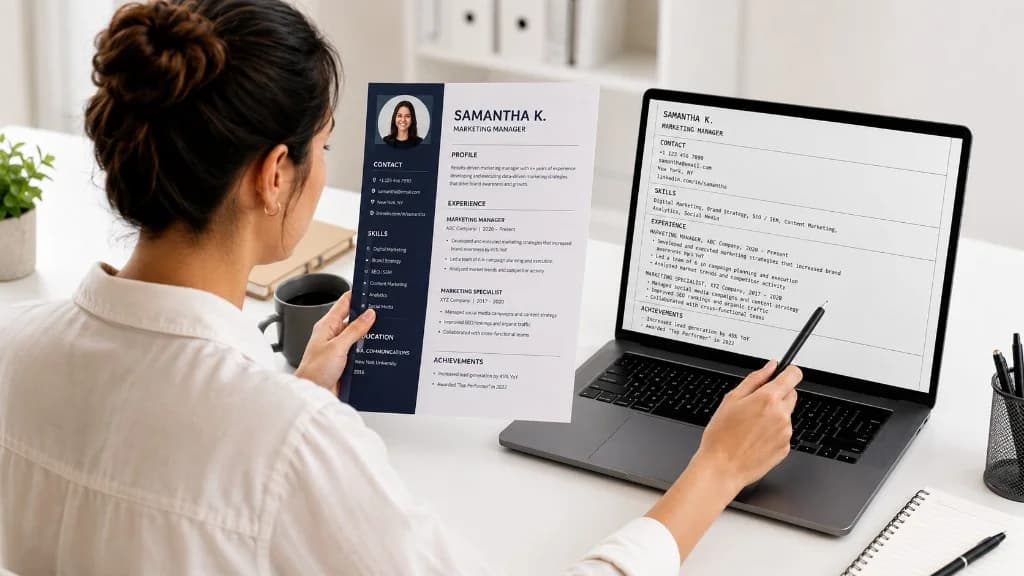
Comparing a designed two-column resume with the plain text-only version an ATS parses on a laptop — resume formatting that breaks ATS parsing
આ પેજ પર8
Jump to the sections that matter.
આ પેજ પર8
Jump to the sections that matter.
1. Multi-column layouts2. Tables3. Text boxes4. Headers and footers5. Graphics, icons, and images6. Non-standard fonts7. Unusual section headingsWhat good ATS formatting looks like

આ પેજ પર

8

Jump to the sections that matter.

1. Multi-column layouts2. Tables3. Text boxes4. Headers and footers5. Graphics, icons, and images6. Non-standard fonts7. Unusual section headingsWhat good ATS formatting looks like

Introduction

Some resume formatting choices look beautiful to a human and confuse a parser.

Most candidates do not know which is which. That is a problem, because the parser sees your resume first.

Here are the formatting choices that consistently cause problems — and what to use instead.

1. Multi-column layouts

Two-column or three-column templates look elegant.

ATS often reads them in the wrong order. Your skills end up halfway through your education. Your contact details land inside an experience entry.

Use a single-column layout. The slightly less designed look is worth being readable.

2. Tables

Tables are useful for laying out information visually.

ATS often cannot extract content from inside table cells correctly. Whatever you put in a table may not appear in the parsed resume the recruiter searches.

Use plain headings and indented bullets instead.

3. Text boxes

Text boxes are designer tricks for putting content in specific positions.

Most ATS ignores them entirely. Anything in a text box may not be visible to the system at all.

Put critical content in the main text body, not in floating elements.

4. Headers and footers

Many candidates put their name and contact details in the header.

Some ATS does not parse content in headers and footers. Your contact details disappear from the recruiter's view of your application.

Put your name and contact details in the main body at the top of the page.

5. Graphics, icons, and images

An icon next to your phone number does not make your resume more ATS-friendly. It makes it harder to parse.

Anything inside an image — including text — is invisible to the parser. Stick to plain text for anything you want the system to read.

6. Non-standard fonts

Standard fonts — Arial, Calibri, Times, Helvetica, Georgia — parse cleanly.

Decorative fonts can render as garbage characters depending on the parser. Stick to common fonts. Save creative typography for portfolio sites, not your resume.

7. Unusual section headings

"My Story." "What Drives Me." "Adventures."

These do not parse as standard sections. The parser does not know whether they are work, education, or something else, so it categorizes them poorly — or not at all.

Use standard section names. Education. Experience. Skills. Projects. Certifications. Boring works.

What good ATS formatting looks like

Single column. Standard fonts. Standard section headings. Plain text contact details at the top. Bullets for experience. No tables, no text boxes, no images for critical content.

It does not have to be ugly. It does have to be readable to a machine that is reading thousands of resumes.

Related reading on GyanBatua

Go deeper on ATS and screening:

  • The Real Reason You're Getting Auto-Rejected: ATS, AI Screeners, and HR Bots Decoded
  • How ATS Scoring Actually Works (and What It Looks For)
  • Resume Mistakes That Hurt ATS Visibility
  • How to Match Your Resume to a Job Description Before You Apply

Recommended tool

Check whether your resume format is hurting ATS parsing.

Upload your resume, paste the job description, and see:

  • layout and structure signals
  • parseability risks
  • JD keyword visibility
  • what to fix before you apply
Check My Resume–JD Match

Resume guides

Related Resume Guides

  • Resume Guides by Job Role
  • Software Development Engineer (SDE) Resume Guide
  • Data Analyst Resume Guide
  • Business Analyst Resume Guide
  • Create Resume with AI

પ્રાઇસિંગ

તમારો પ્લાન પસંદ કરો અને ઝડપથી શરૂઆત કરો

ફીચર્સ, ભાવ અને ઉપયોગ સ્પષ્ટ રીતે સરખાવો, પછી તમારા લક્ષ્યને અનુરૂપ પ્લાન પસંદ કરો.

પ્રાઇસિંગ જુઓ

આગલું પગલું

તમારા રેઝ્યૂમેને સાચા જૉબ ડિસ્ક્રિપ્શન સામે ચકાસો

Apply પહેલાં JD match, keyword visibility અને skill gaps જુઓ.

Resume–JD Match ચકાસો

સંબંધિત વાંચન

8
Resume Format for Wipro and Capgemini Off Campus Drives — Fresher GuideATS Friendly Resume India — The Complete Checklist for 2025Why You're Not Getting Shortlisted for Jobs in India (And How to Fix It)The Real Reason You're Getting Auto-Rejected: ATS, AI Screeners, and HR Bots DecodedHow ATS Scoring Actually Works (and What It Looks For)Keywords vs Keyword Stuffing: Where the Line IsHow to Test If Your Resume Passes ATS Before You ApplyWhy Your PDF Resume Might Be Failing (and What to Use Instead)

તાજેતરના લેખો

6
How to Build a Job Search That Doesn't Burn You OutGive Your Job Search a Boundary — Why a Finite Time Budget Changes EverythingFewer, Better Applications — Why Targeting Beats Volume in a Job SearchMeasure the Job Search Progress You Control — Not Just the OfferWhat a Sustainable Job Search Week Actually Looks LikeResume for TCS NQT Fresher — What iCIMS Actually Scans For

તમારા માટે

તમને આગળ વધતા રાખવા સંબંધિત અને તાજેતરના લેખો.

પ્રાઇસિંગ

તમારો પ્લાન પસંદ કરો અને ઝડપથી શરૂઆત કરો

ફીચર્સ, ભાવ અને ઉપયોગ સ્પષ્ટ રીતે સરખાવો, પછી તમારા લક્ષ્યને અનુરૂપ પ્લાન પસંદ કરો.

પ્રાઇસિંગ જુઓ

આગલું પગલું

તમારા રેઝ્યૂમેને સાચા જૉબ ડિસ્ક્રિપ્શન સામે ચકાસો

Apply પહેલાં JD match, keyword visibility અને skill gaps જુઓ.

Resume–JD Match ચકાસો

સંબંધિત વાંચન

8
Resume Format for Wipro and Capgemini Off Campus Drives — Fresher GuideATS Friendly Resume India — The Complete Checklist for 2025Why You're Not Getting Shortlisted for Jobs in India (And How to Fix It)The Real Reason You're Getting Auto-Rejected: ATS, AI Screeners, and HR Bots DecodedHow ATS Scoring Actually Works (and What It Looks For)Keywords vs Keyword Stuffing: Where the Line IsHow to Test If Your Resume Passes ATS Before You ApplyWhy Your PDF Resume Might Be Failing (and What to Use Instead)

તાજેતરના લેખો

6
How to Build a Job Search That Doesn't Burn You OutGive Your Job Search a Boundary — Why a Finite Time Budget Changes EverythingFewer, Better Applications — Why Targeting Beats Volume in a Job SearchMeasure the Job Search Progress You Control — Not Just the OfferWhat a Sustainable Job Search Week Actually Looks LikeResume for TCS NQT Fresher — What iCIMS Actually Scans For

ભલામણ કરેલ

2
Breaking Into PM, Data, Design, AI — A Realistic RoadmapHow to Match Your Resume to a Job Description Before You Apply
Check My Resume–JD Match